

Sathiyanarayan is a Software Engineer at Psiog, building end-to-end solutions across React and Spring Boot, from initial idea through integration and production readiness. His focus areas include practical applications of AI, developer productivity, and modern software engineering.
Flowzy grew from that interest: a personal initiative to reduce the repetitive planning work developers do before writing code, and to address a specific workflow problem: turning a software ticket into a clear, actionable implementation plan without moving between tools. At Psiog, engineers have the space to experiment with emerging technologies and turn ideas into working proofs of concept. Flowzy is one such outcome.
Ticket → Understand → Plan → Track → Implement → Document
Summary
Flowzy is a personal initiative exploring how AI can shorten the gap between a software ticket and actual implementation. It brings Jira, Azure DevOps and GitHub ticket information into VS Code and converts requirements into structured implementation runbooks using GitHub Copilot. The architecture combines AI-generated planning with deterministic fallbacks so that the workflow remains usable even when AI assistance is unavailable. Provider abstraction, local secure credential storage, and Markdown-based output were chosen to keep the POC lightweight, extensible, and easy to adopt. The development journey highlighted the importance of reducing context switching while keeping developers in control of AI-generated suggestions. Initial workflow measurements indicate that repetitive ticket-planning work could potentially be reduced from roughly 30–45 minutes to a few minutes for suitable tickets. The next stage would be repository-aware runbooks, OAuth-based authentication, Git-aware progress tracking, and controlled synchronization with project-management systems. Overall, the initiative gave me hands-on experience in designing an AI-enabled developer utility where AI is one component of a broader, reliable software system.
1. Problem statement
A developer’s work often starts well before the first line of code is written. A significant amount of this initial planning happens manually. A developer typically switches between Jira and the IDE while understanding a ticket and planning the implementation. Translating the requirements into clear, actionable development steps is not always straightforward, especially for unfamiliar or complex tasks.
There are already many AI coding assistants that help developers write or modify code. However, a smaller gap exists between:
“Here is a dev ticket”
and
“Here is the structured implementation plan a dev should follow in this repository.”
Existing tools can generate code or answer questions, but the workflow He wanted to explore was more specific:
Flowzy was created as a side project to experiment with this workflow inside the developer’s existing environment rather than introducing another standalone application.
Impact radius
The problem is not limited to developers.
Persona | Challenge |
Developer | Spends time interpreting tickets and manually creating implementation steps |
Junior Developer | May struggle to translate acceptance criteria into concrete technical tasks |
Senior Developer / Tech Lead | Needs to review whether implementation approaches are consistent |
QA Engineer | Depends on accurate interpretation of acceptance criteria |
Engineering Manager | Has limited visibility into how a ticket is progressing from requirement to implementation |
Project Manager | Primarily sees ticket status rather than the actual implementation journey |
The goal of Flowzy was not to replace these roles or automate engineering decisions. It was to reduce the repetitive planning and documentation work around them.
2. Approach & Design philosophy
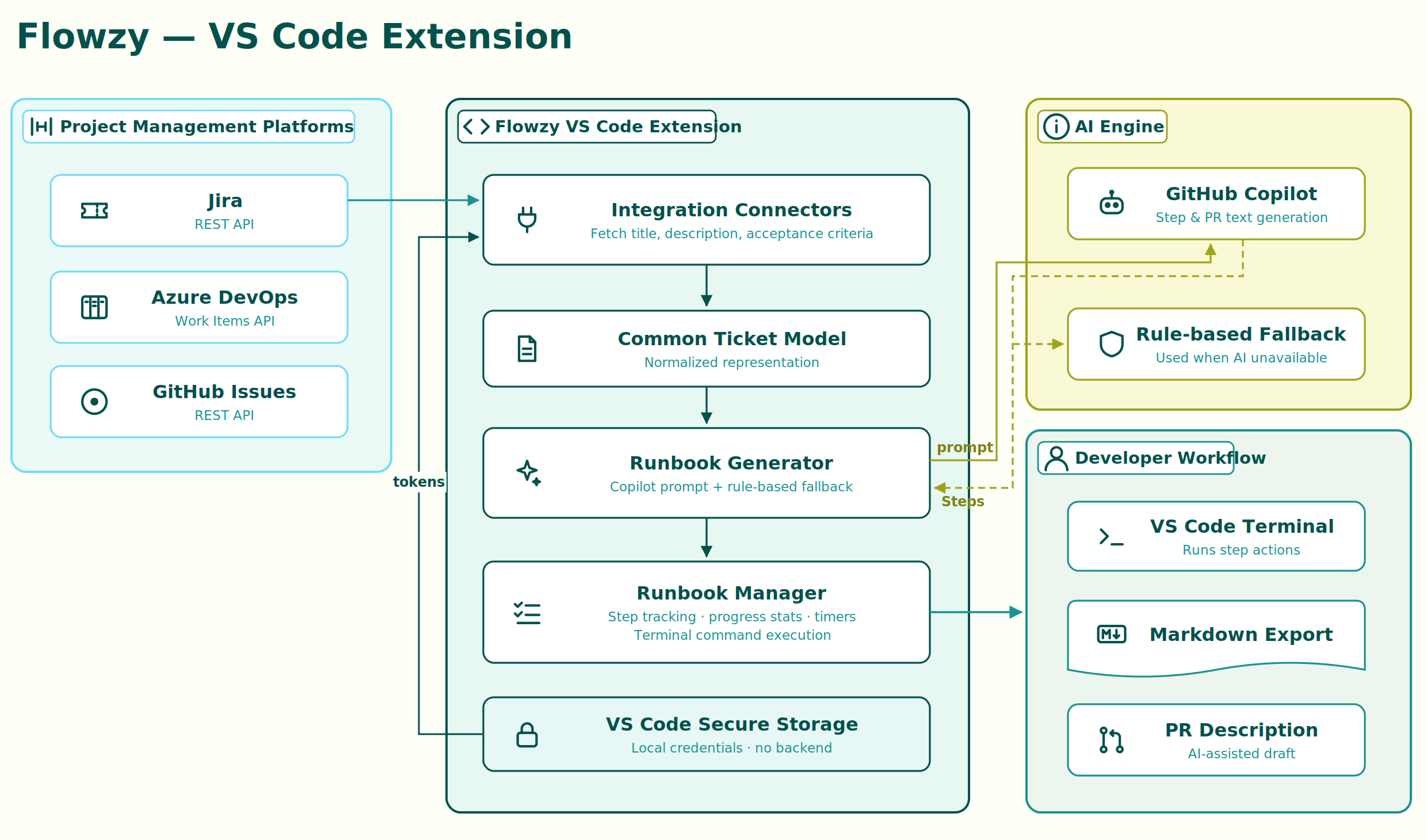
The approach was to bring the ticket-to-implementation workflow into VS Code through a lightweight extension. Instead of building a separate application, Flowzy works within the developer’s existing IDE and connects to Jira to retrieve ticket details.
The workflow is –
The approach was to bring the ticket-to-implementation workflow into VS Code through a lightweight extension. Instead of building a separate application, Flowzy works within the developer’s existing IDE and connects to Jira to retrieve ticket details.
The workflow is –
Jira Ticket → Flowzy → AI Analysis → Implementation Runbook → Execute → Track Progress → Document
- Retrieve – The developer provides the Jira ticket, and Flowzy retrieves the relevant description and acceptance criteria.
- Analyze – The ticket information is passed to GitHub Copilot to identify the implementation approach and break the work into actionable steps.
- Generate – Flowzy presents the AI response as a structured runbook with individual steps that can be tracked.
- Execute – The developer works through the steps and can use the integrated terminal for relevant actions.
- Track – Flowzy tracks completed steps, provides progress statistics, and includes timers to give the developer visibility into the time spent on the implementation.
- Document – The completed runbook can be exported as Markdown, and an AI-generated PR description can be created from the implementation.
The implementation was intentionally kept lightweight. GitHub Copilot was used instead of building a custom AI model, while a rule-based fallback was added to maintain basic functionality when AI assistance is unavailable. Credentials are stored locally using VS Code Secure Storage, avoiding the need for a backend at this stage.
The goal was not to automate development completely, but to help developers move from understanding a ticket to implementing and tracking the work within a single environment.
3. Technology choices
Area | Choice | Reason |
Developer platform | VS Code Extension API | Keeps the workflow inside the IDE |
AI | GitHub Copilot | Developer-focused AI capability and existing IDE integration |
Project management | Jira / Azure DevOps / GitHub | Supports existing team workflows |
Authentication | VS Code Secure Storage + provider tokens | Avoids unnecessary backend infrastructure for the POC |
Export | Markdown | Lightweight, portable and version-control friendly |
Execution | VS Code Integrated Terminal | Keeps implementation actions inside the development environment |
PR assistance | AI-generated description | Reduces repetitive documentation work |
The overall technology strategy was to reuse capabilities already present in the developer ecosystem instead of introducing infrastructure where it was not necessary.
4. Developer journey / build experience
Sathiya approached the initiative incrementally rather than trying to build every feature at once.Phase 1 – Validate the core idea
The first objective was to answer one question:
Can a VS Code extension take a real development ticket and turn it into useful implementation steps?
The initial focus was therefore kept small:
VS Code → Fetch Ticket → Read Requirements → Generate Runbook → Display Steps
The purpose of this phase was to validate the workflow before investing in additional integrations.
Phase 2 – Make it useful inside the IDE
Once the basic flow worked, the focus shifted toward developer interaction.
Features such as:
- Step-by-step progress tracking
- Interactive completion
- Terminal actions
- Markdown export
were introduced to make the runbook part of the development process rather than simply an AI-generated document.
The workflow became:
Understand → Plan → Track → Execute → Document
Phase 3 – Expand integration
The next focus was reducing vendor dependency by supporting multiple ticket providers.
Ticket Source:
Jira / Azure DevOps / GitHub → Normalized Ticket Model → AI Runbook
This phase exposed an important engineering lesson: integrating different systems is often less about the API call itself and more about normalizing differences in data models, authentication and error handling.
Phase 4 – Improve the developer workflow
The final layer focused on the activities that happen after planning:
- Execute commands through the integrated terminal
- Track implementation progress
- Export Markdown documentation
- Generate AI-assisted PR descriptions
This turned the utility from a simple ticket-to-plan generator into a lightweight implementation companion.
Trade offs
A few trade-offs were made during the build:
- VS Code extension over web application → keeps the workflow within the developer’s existing environment.
- GitHub Copilot over a custom AI model → avoids the complexity of building and maintaining an AI layer for the POC.
- Rule-based fallback alongside AI → provides basic functionality even when AI assistance is unavailable.
- Local secure storage over a backend → keeps the POC simple while avoiding unnecessary infrastructure.
5. Impact & Outcome
The following metrics highlight the potential productivity improvements Flowzy can bring by simplifying ticket understanding, implementation planning, and documentation.
Developer
Before
Ticket → Read → Interpret → Create own checklist → Start development
With Flowzy
Ticket → Generate runbook → Start development
Potential planning effort:
~30–45 minutes → ~5 minutes
for tickets where the requirements are sufficiently clear.
Junior Engineers
- Provides a starting point when requirements are unfamiliar
- Converts acceptance criteria into smaller technical tasks
- Reduces the blank-page problem when beginning implementation
Senior Engineers
- Less time spent writing repetitive PR descriptions
- Faster initial decomposition of routine tickets
- More time available for reviewing design and implementation quality
A conservative target for PR documentation assistance is approximately:
5–10 minutes saved per PR
QA / Engineering Management
- Clearer implementation steps
- Easier handoff between development and QA
- Markdown runbooks provide an additional view of implementation progress
Area | Potential improvement |
Initial ticket planning | ~25–40 minutes saved |
Runbook creation | Reduced to a few minutes |
PR description | ~5–10 minutes saved |
Context switching | Reduced by keeping workflow in VS Code |
Vendor dependency | Reduced through multiple provider integrations |
The larger value is not necessarily the number of minutes saved on one ticket. It is the possibility of reducing the same repetitive activity across many tickets.
6. What next?
The most impactful next step would be replacing PAT-based authentication with OAuth 2.0 for both Azure DevOps and Jira. This would remove the credential management burden entirely for end users and make Flowzy deployable as a team-wide standard without requiring each developer to generate and manage tokens manually.
Deeper Git integration – reading actual commit history and auto-matching commits to steps – would close the loop between the runbook and the code. An Azure DevOps work item states update on ticket completion (automatically moving the ticket to “Done” via the API) would eliminate a manual step that currently sits outside Flowzy’s scope.
7. Author’s note
Building Flowzy gave me an opportunity to move beyond using AI as a coding assistant and explore how AI can be embedded into an actual developer workflow.
It strengthened my understanding of AI integration, extension development, API integration, fallbacks, developer experience, and the trade-offs involved in building reliable AI-enabled tools.
At Psiog, I have the opportunity to experiment with emerging AI technologies and turn those experiments into practical solutions. This initiative is one example of how I am exploring AI not only as a technology, but to improve how engineers build software.